
What is the Field Lens and How to Install?
In the WeCreat Lumos Ultra 6W UV Laser, the field lens (also called an F-theta lens or scan lens) is a key optical component in the laser system. Its main function is to ensure that the laser beam remains accurately focused and maintains consistent engraving quality across the entire working area.
When a galvo scanner moves the laser beam to different positions, the beam angle changes. Without a field lens, the focus point would shift, causing uneven engraving results — the center area may be sharp, while the edges may become blurred or less precise.
The field lens helps to:
- Maintain a consistent focus across the entire engraving area
It compensates for optical distortion during scanning, ensuring the laser spot remains focused from the center to the edges. - Control the laser spot size
A properly designed field lens helps achieve a smaller and more stable laser spot, which is essential for UV laser applications requiring high precision and fine details. - Improve engraving consistency and accuracy
It ensures uniform engraving depth, line thickness, and detail quality throughout the working area.
For the Lumos Ultra UV laser, different field lenses are designed for different applications:
- Green field lens: Designed for K9 crystal internal engraving, where the laser needs to focus precisely inside transparent materials.
- Purple field lens: Designed for flat engraving and rotary engraving applications.
- Red field lens: Designed for MOPA laser applications.
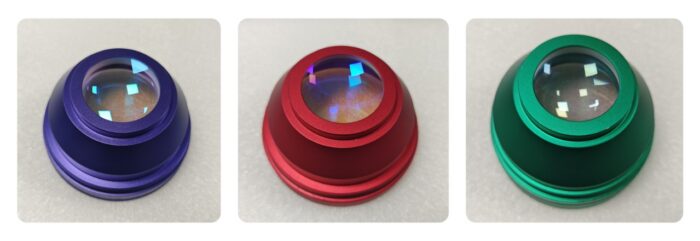
The field lens is not a consumable part and normally does not need to be replaced frequently. However, it should be kept clean and handled carefully, as dust or fingerprints on the lens surface can affect laser focus and engraving performance.
How to install:
- Turn right to tighten.
- Turn left to loosen.
Note:
- When installing the field lens, please handle it carefully to prevent it from falling and causing damage or cracks to the lens.
- Make sure the field lens is fully tightened after installation. If it is not properly secured, the system may not be able to recognize the field lens, which could affect the next operation.